Why Are Healthcare Providers Losing Time?
Provider time has quietly become one of the most strained resources in healthcare — and the data makes that impossible to ignore.
Every day, providers spend nearly an hour lost in administrative work. That lost hour adds up to over four weeks per year per provider, and the consequences are felt across the clinic.
Providers today spend a large share of their day on non-clinical work. Instead of focusing on patient care, many hours are consumed by documentation, billing coordination, insurance follow-ups, and navigating complex EHR systems. These tasks are necessary, but the way they are handled creates friction.
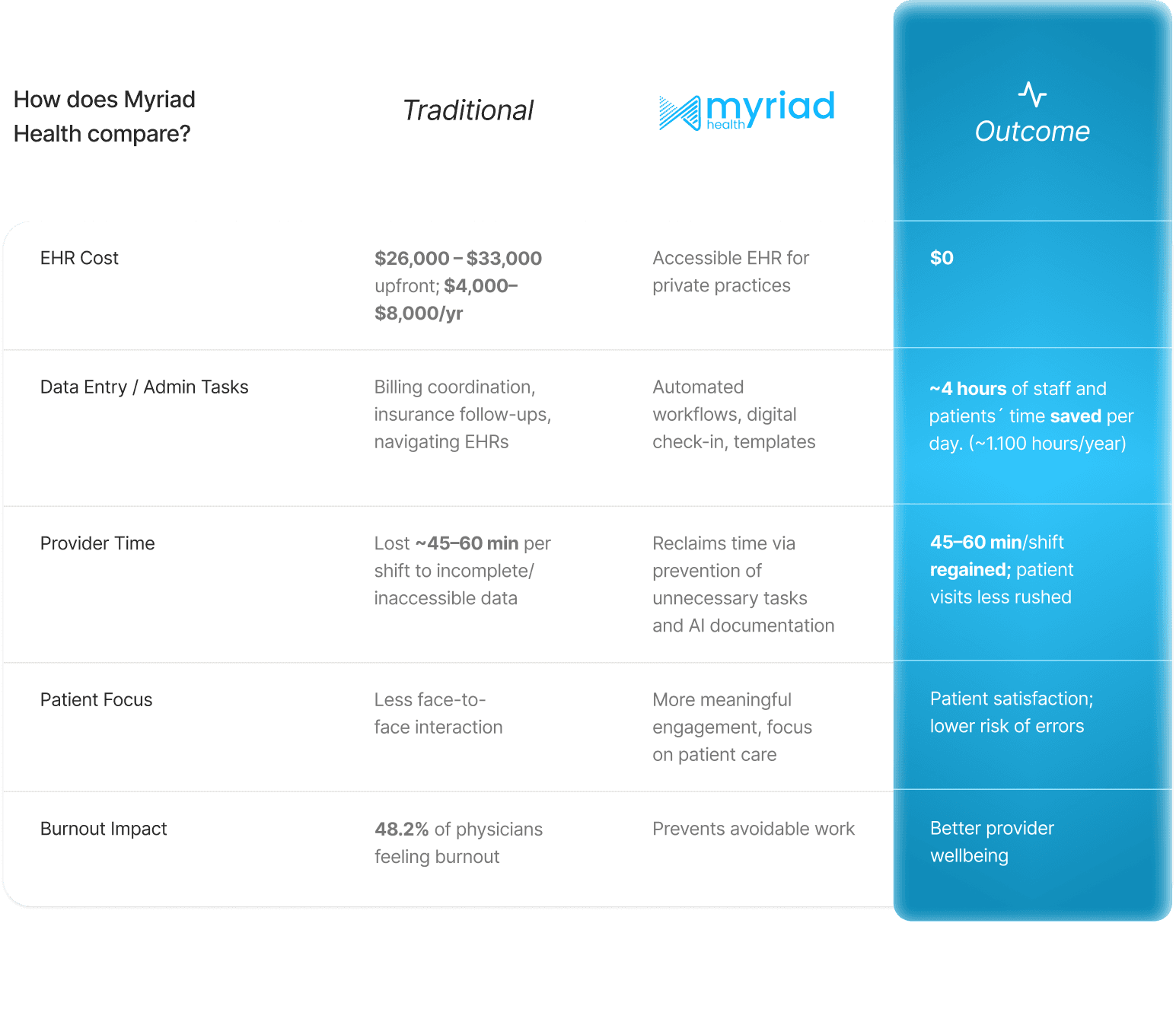
Providers are also working longer days, largely due to growing administrative workloads. A Philips study found that 83% of healthcare professionals lose clinical time during their shift due to incomplete or inaccessible data. Nearly 45% report losing more than 45 minutes per shift. That is time taken directly away from patients.
Over time, this administrative load adds up. Patient visits become shorter, schedules run tighter, and providers are left finishing charts and inbox tasks after hours. According to the Future Health Index 2025, delays in care have become more common, with patients waiting up to 59 days for specialist appointments. The result is a system where provider time is steadily eroded by avoidable work, which we will explore later.
The impact on providers themselves is just as serious. The American Medical Association (AMA) survey revealed that 48.2% of physicians reported at least one symptom of burnout, nearly double the rate of the general working population. The recommendation of AMA was to go upstream and prevent unnecessary work from entering the system in the first place. Many messages, tasks, and data requests never should have reached providers at all. This matters even more as workforce shortages grow. In the U.S., physician shortages are expected to reach 187,000, with an additional 63,000 registered nurses needed in the coming decades, according to the World Economic Forum. With fewer clinicians available, healthcare cannot afford systems that waste provider time. As the Forum notes, to maximize the impact of intelligent automation, healthcare must act now.
Why Every Minute of Lost Provider Time Matters
Every minute lost affects the quality and efficiency of care, and ultimately, the entire practice. Here’s how:
Less time per patient: When providers are pressed for time, patient visits become rushed.
Higher risk of errors: Time pressure increases the likelihood of mistakes fo misread charts, overlooked symptoms, or errors in prescriptions.
Longer wait times: Every additional 10 minutes a patient waits past their scheduled appointment can noticeably lower satisfaction scores.
Slower practice growth: A five-minute delay can create a “domino effect”, stressing staff, upsetting patients, and slowing practice efficiency.
Operational & Financial Impact: For every minute a provider isn’t seeing patients, the organization loses potential revenue. Some estimates suggest that a single day of delayed onboarding or workflow inefficiencies can cost a medical group over $10,000.
Now that we’ve seen how provider time is stretched thin, the question is no longer whether provider time is being lost. It's how healthcare systems can stop the loss.
Top 3 Ways to Save Provider Time in Healthcare
1. Reduce Administrative Work Before the Visit Begins
Studies already show what happens when workflows are designed to reduce friction. The time savings are driven by small but frequent reductions in administrative friction, such as less manual typing, fewer incomplete forms, and fewer post-visit follow-ups. Data from QURE4U shows that digital check-in alone can remove hundreds of thousands of data-entry clicks each year, which corresponds to approximately 10 minutes saved per patient. Across a typical day, this might result in more than 4 hours saved, or around 1,100 hours per year.
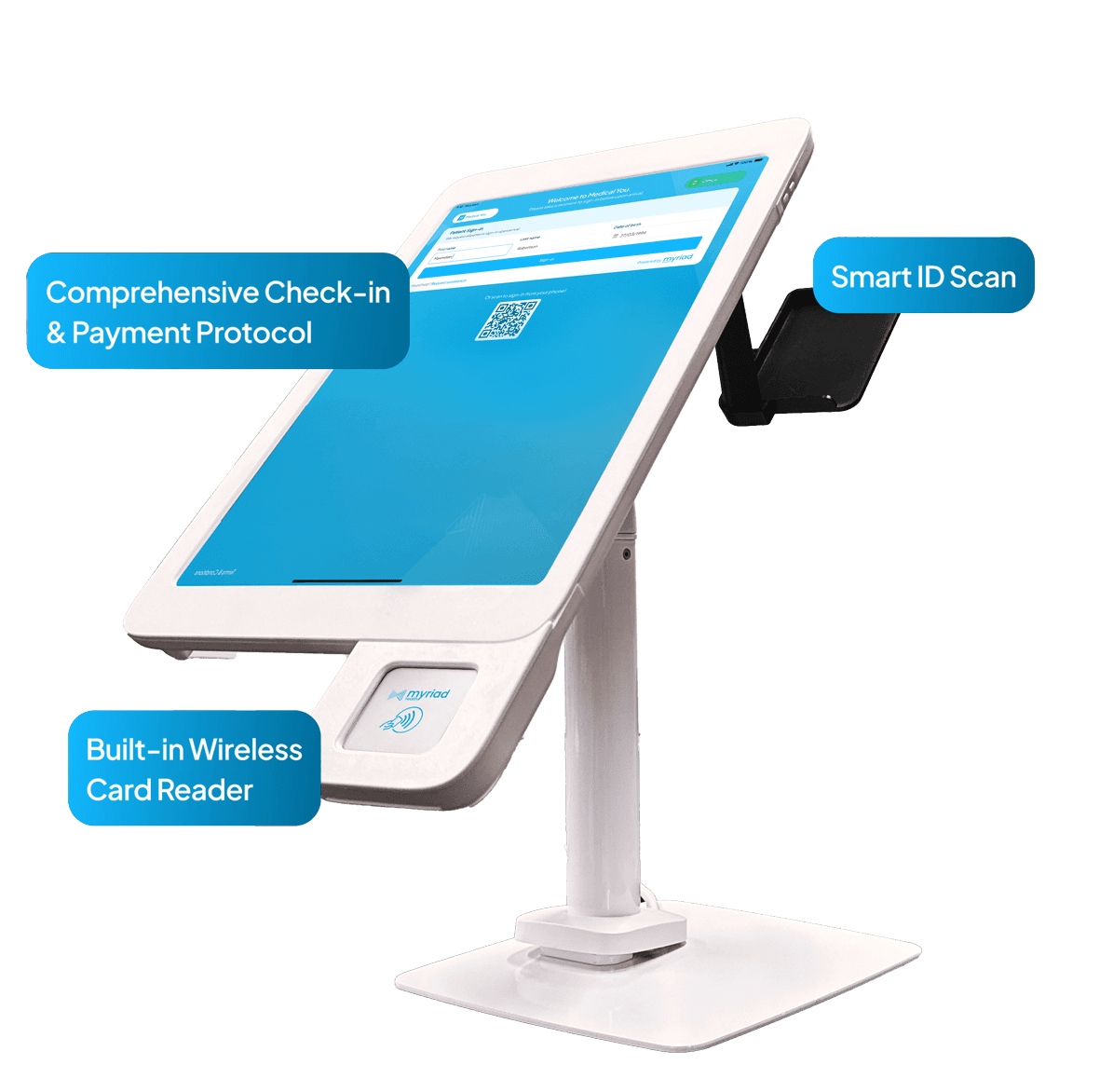
Myriad Health Custom Kiosk is designed to deliver this, turning small but frequent administrative tasks into effortless automation. Patients can check in themselves, scan their ID or insurance card, and complete forms right from the waiting room. The system then automatically updates appointment statuses, flags any missing items, and even provides payment estimates.
Claim your complimentary Kiosk and software by signing up in this link.
2. Use EHR Systems Designed to Save Time
EHR systems are the foundation of modern healthcare operations. When designed well, they centralize scheduling, patient communication, clinical documentation, and access to medical records in one place. For providers and staff, this means fewer paper records, less manual tracking, and faster access to critical information.
However, traditional EHR systems often introduce a new challenge: cost and complexity. The average initial purchase and implementation of an EHR alone can cost between $26,000 and $33,000, with annual costs reaching $4,000 to $8,000. For many physicians starting or maintaining a private practice, these costs can be a major barrier.
Despite the expense, EHRs are essential. They support day-to-day operations, improve coordination of care, and help practices meet regulatory and documentation requirements. The challenge is ensuring that EHR systems reduce workload rather than add to it.
Myriad Health’s EHR reduces one of the largest cost barriers for private practices. It enables them to maintain efficient operations without adding financial strain. The goal is simple: keep private practices accessible and operational without forcing providers to trade time or quality for affordability.
EHRs help reclaim provider time by:
Reducing repetitive data entry
Automatically surfacing relevant patient information
Preventing errors before they require manual correction
Streamlining communication between clinical and billing workflows
Instead of reacting to issues after they occur, the system helps prevent unnecessary work from entering the system in the first place. This system aligns directly with the AMA’s recommendation to “go upstream.”
3. Improve Documentation Accuracy Inside the EHR
As we saw earlier, documentation remains one of the largest drivers of after-hours work for providers. MyScribeAI is designed to address documentation challenges directly within the EHR, without forcing providers to rely on separate tools or external systems. Instead of typing full notes manually, providers can use structured templates and guided inputs, allowing the system to generate complete clinical notes automatically.
Providers can enter key information, reference patient intake forms, past notes, history, macros, and codes, and the system builds a structured narrative mapped to the appropriate format, such as a SOAP note or history and physical. What once took an hour or more per encounter can often be completed in just minutes.
The result is:
Fewer hours spent charting after clinic
More accurate and consistent documentation
Improved patient engagement during visits
A more sustainable workday for providers
It also supports ambient documentation. With patient consent, in-office conversations can be transcribed in a HIPAA-compliant manner and converted into structured notes that align with the provider’s preferred format. It operates entirely within the EHR environment, and documentation remains secure and centralized.
Protecting Private Practices by Protecting Provider Time
Provider time is one of the most valuable resources in healthcare. When systems are designed to protect it, everyone benefits providers, patients, and practices alike.
Learn how Myriad Health helps practices reclaim provider time with accessible EHR tools, smarter documentation, and automated workflows.